
Duplis
Take the same photo twice. Overlay a previous photo on the live camera, then line up the new frame by eye or with an on-device alignment helper.
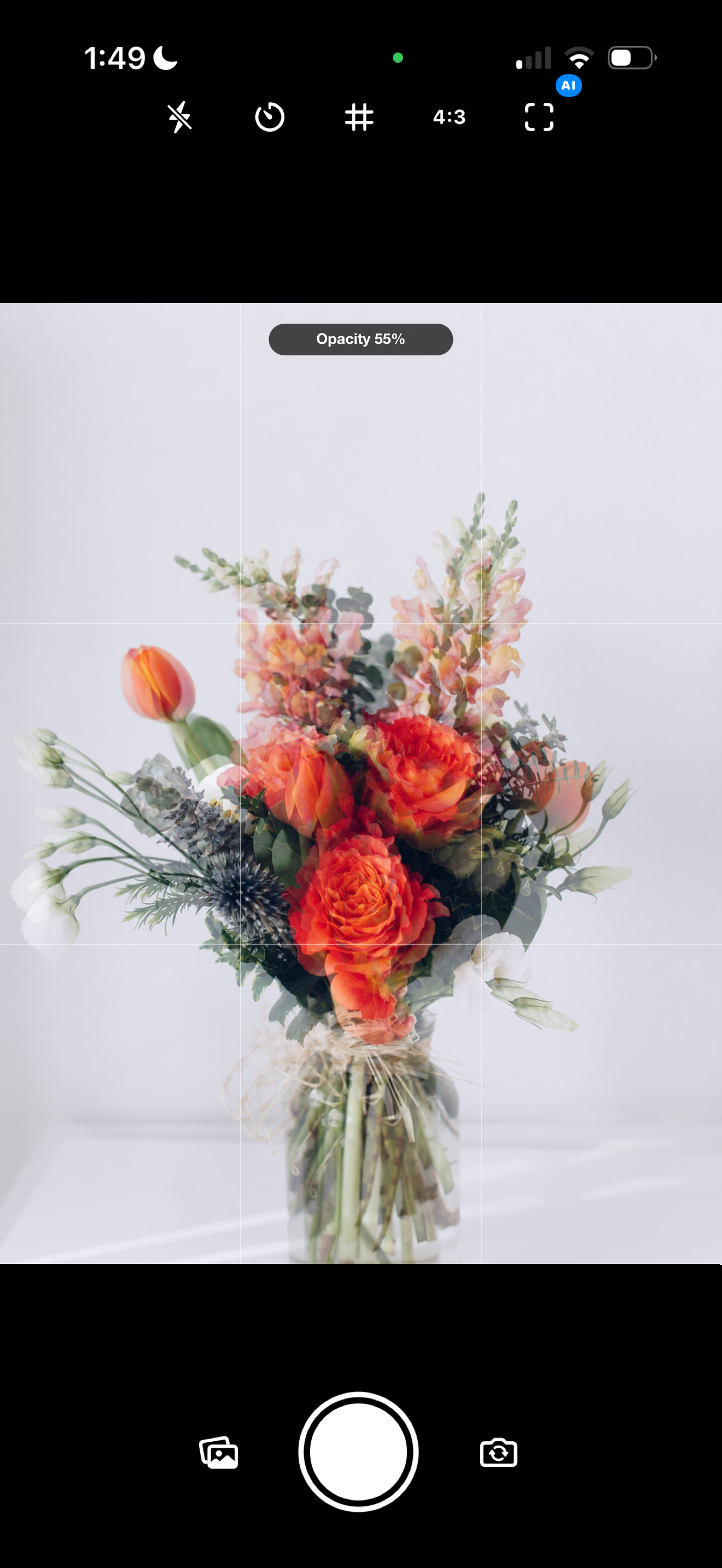
Frame-match any photo
Choose a reference from your photo library and Duplis places it directly over the viewfinder. Swipe up or down to move from a faint 10% guide to a strong 90% overlay. The reference stays visible between shots, so repeated photos stay consistent.
Alignment help, on device
Switch on Alignment mode for live guidance that compares the reference with the current frame. Duplis points out the direction to move and helps settle the camera when the composition matches. The analysis uses Apple frameworks on your iPhone; your photos are not uploaded for processing.
Made for repeatable frames
Recreate a family photo years later. Track a renovation from the same angle. Build a consistent product catalog. Match continuity between takes. Document a garden, a job site, a collection, or anything else that changes over time.
Download the app
COMING SOON
Does the overlay appear in my photo?
No. Duplis captures the clean camera image and keeps the reference only in the viewfinder.
What happens to my photos?
Camera and photo-library access stay on your device. Duplis has no account system, advertising, tracking, or analytics, and does not sell or share personal data.
Can I use different aspect ratios?
Yes. The reference is centered and cropped to match the active camera stage, including 1:1, 4:3, and 16:9 compositions.